
Download Adlice Protect (RogueKiller) – Anti-malware, Security Tool, PC Protection
Overview
Adlice Protect (RogueKiller) is a mobile security application designed to help users safeguard their devices against malicious software and potential threats. Developed by Adlice, the app functions as a protective utility aimed at detecting and managing harmful files across mobile environments. While the app is rooted in the legacy of its Windows counterpart, RogueKiller Anti-malware, the mobile version adapts its core principles to the smartphone ecosystem. Its primary purpose is to scan for suspicious applications, unauthorized access attempts, and potentially harmful behaviors that could compromise device integrity or user data.
The app targets users who prioritize digital security, particularly those with advanced awareness of mobile threats or those managing multiple devices. It may appeal to individuals who value transparency and control in their security tools, preferring solutions that do not operate silently in the background. Real-world use cases include routine device checks, post-download verification of new apps, and proactive protection during high-risk activities such as public Wi-Fi usage or file transfers.
Although the developer did not provide additional technical details about the app’s architecture or threat detection methodology, its positioning within the mobile security landscape suggests it serves as a supplementary layer of defense. In a market saturated with automated antivirus solutions, Adlice Protect (RogueKiller) offers a more hands-on approach, empowering users to review and decide on potential threats rather than relying solely on automatic removal.
Key Features & Functionality
- Thorough Threat Scanning – The app performs deep scans of installed applications and system processes to identify potentially malicious files or behaviors. This functionality is essential for detecting hidden threats that may evade standard security checks.
- Manual Threat Management – Instead of automatically removing detected threats, the app presents users with a list of suspicious entries, allowing them to evaluate each one before deciding whether to quarantine or retain it. This gives users full control over their device’s security decisions.
- Scan History Tracking – The app maintains a log of previous scans, including timestamps and detected items. This feature enables users to monitor the security status of their device over time and assess the effectiveness of regular scanning routines.
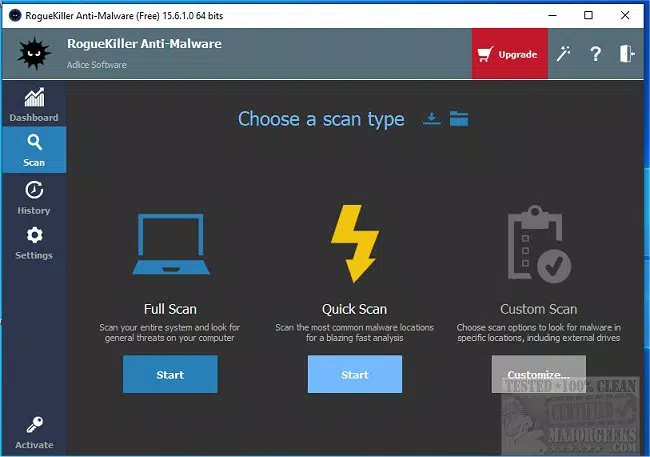
- Intuitive Interface – Designed with usability in mind, the app features a clean layout with accessible navigation. Users can quickly access scanning tools and review results without requiring technical expertise.
- Real-Time Protection Layer – While not explicitly detailed, the app’s structure suggests it provides an ongoing protective layer that activates during key system events such as app installation or file access.
For example, a user who downloads a new app from an unofficial source can initiate a scan to verify its safety before granting permissions. Similarly, someone concerned about privacy may use the app to review background processes that could be transmitting data without consent. These practical applications demonstrate how the app integrates into daily device management.
Interface, UX & Performance
The user interface of Adlice Protect (RogueKiller) is designed to prioritize clarity and ease of navigation. The layout follows a streamlined structure, minimizing visual clutter and allowing users to focus on core functions such as scanning and threat review. Navigation is likely organized through a sidebar or hierarchical menu, enabling quick access to key features without requiring multiple steps.
From a usability standpoint, the app appears optimized for both novice and intermediate users. The absence of complex terminology and the logical flow of actions support a low learning curve. However, the developer did not list formal performance metrics, so specific details about responsiveness under heavy loads or battery consumption remain unspecified.
Although the developer did not list formal performance metrics, the app’s design suggests it is built to operate efficiently across various device categories, including mid-range and high-end smartphones. It likely maintains stability during scanning operations, avoiding crashes or freezes during critical processes. Users can expect consistent behavior across sessions, though real-world performance may vary depending on device hardware and system conditions.
Platform Compatibility & Technical Requirements
Adlice Protect (RogueKiller) is available for Android devices. The app’s operating system requirement is not fully disclosed, but it is designed to function on modern Android versions. The file size is listed as 15.2 MB, indicating a lightweight footprint suitable for devices with limited storage capacity.
Specific requirements such as minimum Android version or device specifications were not provided. The developer did not specify whether the app supports iOS or other platforms. As such, compatibility with non-Android systems cannot be confirmed. Users should verify system compatibility through official distribution channels before attempting installation.
Pros and Cons
Pros
- Lightweight design with a file size of 15.2 MB, ideal for devices with limited storage.
- Empowers users with control over detected threats, promoting informed decision-making.
- Simple and intuitive interface suitable for users with varying technical skill levels.
- Provides scan history for transparency and long-term security tracking.
- Offers a manual approach to malware management, reducing the risk of false positives.
Cons
- Developer did not provide detailed information on supported Android versions or system requirements.
- Specific threat detection mechanisms and update frequency were not disclosed.
- Limited availability—no confirmation of iOS or other platform support.
- Performance under heavy system loads or on older devices was not tested or reported.
- Lack of automated real-time protection details may limit appeal for users seeking hands-off security.
FAQ
Is Adlice Protect (RogueKiller) safe to install on my Android device?
The app is designed as a security utility and is distributed through official channels. However, users should always verify the source before downloading to ensure authenticity and avoid potential spoofed versions.
Does the app require special permissions to function?
The developer did not specify the exact permissions required. However, typical security apps may request access to installed applications, storage, and system information to perform scans and assessments.
How often should I scan my device with this app?
Regular scanning is recommended, especially after installing new apps or downloading files from untrusted sources. A weekly scan is generally sufficient for most users, but those in high-risk environments may benefit from more frequent checks.
Can I use this app on iOS devices?
There is no confirmed support for iOS. The app is currently available only for Android, and no official updates have been announced regarding cross-platform availability.
Does the app receive regular updates?
The developer did not disclose the update frequency. Users are advised to check the app store for updates and ensure they are running the latest version to maintain optimal protection.
Final Thoughts
Adlice Protect (RogueKiller) stands out in the mobile security space by offering a user-centric approach to malware detection and management. Its emphasis on transparency, manual control, and a clean interface makes it a valuable tool for users who want to stay informed about their device’s security status. While it may not replace full-featured antivirus suites, it serves as a reliable supplementary layer for proactive threat monitoring.
Those who value autonomy in their security decisions—such as tech-savvy individuals, privacy-conscious users, or professionals handling sensitive data—will find the app’s philosophy aligns well with their needs. Its lightweight design and straightforward functionality ensure it remains accessible without overwhelming users.
With growing concerns over mobile threats and data privacy, having a tool that empowers users to take charge is increasingly important. Adlice Protect (RogueKiller) delivers a focused, no-frills solution that respects user agency while maintaining a strong protective stance.
Download Adlice Protect (RogueKiller) now


